

Bloggers and content writers are always in need of good-quality images. It is a challenge to find HD images that suit their content. Google is a helpful source, but not an image finder. Besides, the downloaded Google images are either embedded with watermarks or not crispy. Fortunately, Extreme Picture Finder is the solution!
xHamster offers a lot of videos and photos content for free but clicking each page and saving is a monotonous task. Extreme picture xHamster downloader offers bulk downloading and saves time and effort.
Beneficial features of Extreme Picture Finder
- Download preferred music, photos, videos, or any file from any website.
- Download from popular video and photos hosting websites like imgsrc.ru, imagefap.com, xhamster.com, etc.
- Download from TGP [Thumbnail Gallery Posts] and even sites under password protection.
- Download URLs list.
- In-built online image finder
- Allows 30 download simultaneously
- Optimum downloads setting for the majority of popular sites with its online template library.
- Online projects database in combination with multiple ready-to-use projects.
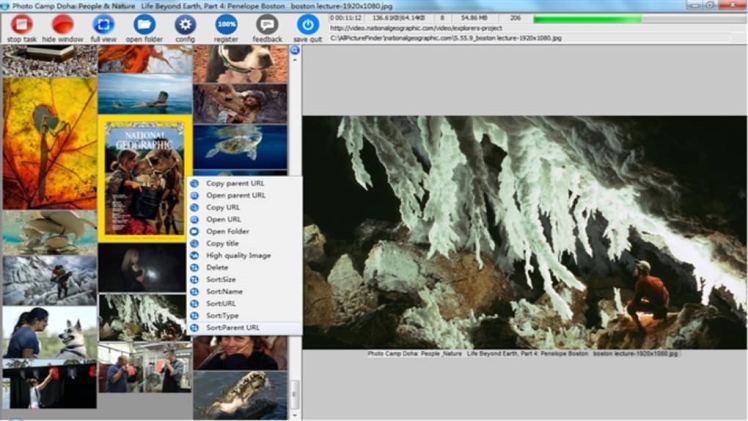
- In-built picture viewer offering slide-show mode and thumbnails.
- Simple and intuitive interface offering multiple language translations.
Extreme Picture Finder empowers to download images or other media files from keyword search results associated with popular search engines or a specific website.
How does Extreme Picture Finder work?
Configure the requirement to download all images or the ones that suit specific criteria like file type, size, path dimension, and more details. Advanced options to configure the file naming rules, set download limits, exclude URLs, etc. are also offered.
- Download the latest version of the Extreme Picture Finder tool and install it.
- Now, from the template’s library find a suitable template for the URL and download it.
- Open the downloaded file using Extreme Picture Finder and add this template to the local template library
- Open the local template library browse and the installed new template will be visible.
- On Create New Project page users will need to paste the URL in a box ‘Starting address’
- Extreme Picture Finder will automatically detect which template to use automatically.
- Click Finish and allow the tool to download every file.
In case, the template doesn’t get chosen automatically then click the ‘Next’ button and choose manually.
For using the in-built picture finder, type the keyword. The tool will download plenty of relevant images. There are different search modes and filtering options to fine-tune the results. It helps to attain the precise image users are looking for.
Different search modes allow experiencing different interaction levels with the download process. If the program is allowed to find and download just thumbnails then there will be hundreds of images visible in seconds, it is the fastest search mode. Users can even select full-size images for manual downloads. Besides, the program is capable to save every related image on the page the original full-size photograph is positioned.
As the name advocates, the Extreme Picture Finder tool is a captivating image downloader that allows the user to download every picture automatically from websites. Not just images, but the user can download videos, music, and other file types available on the websites.
